Import & Export
The Download and Upload buttons in the Custom Token Overrides header let you export your current token overrides as a CSS file and import overrides from an existing CSS file.
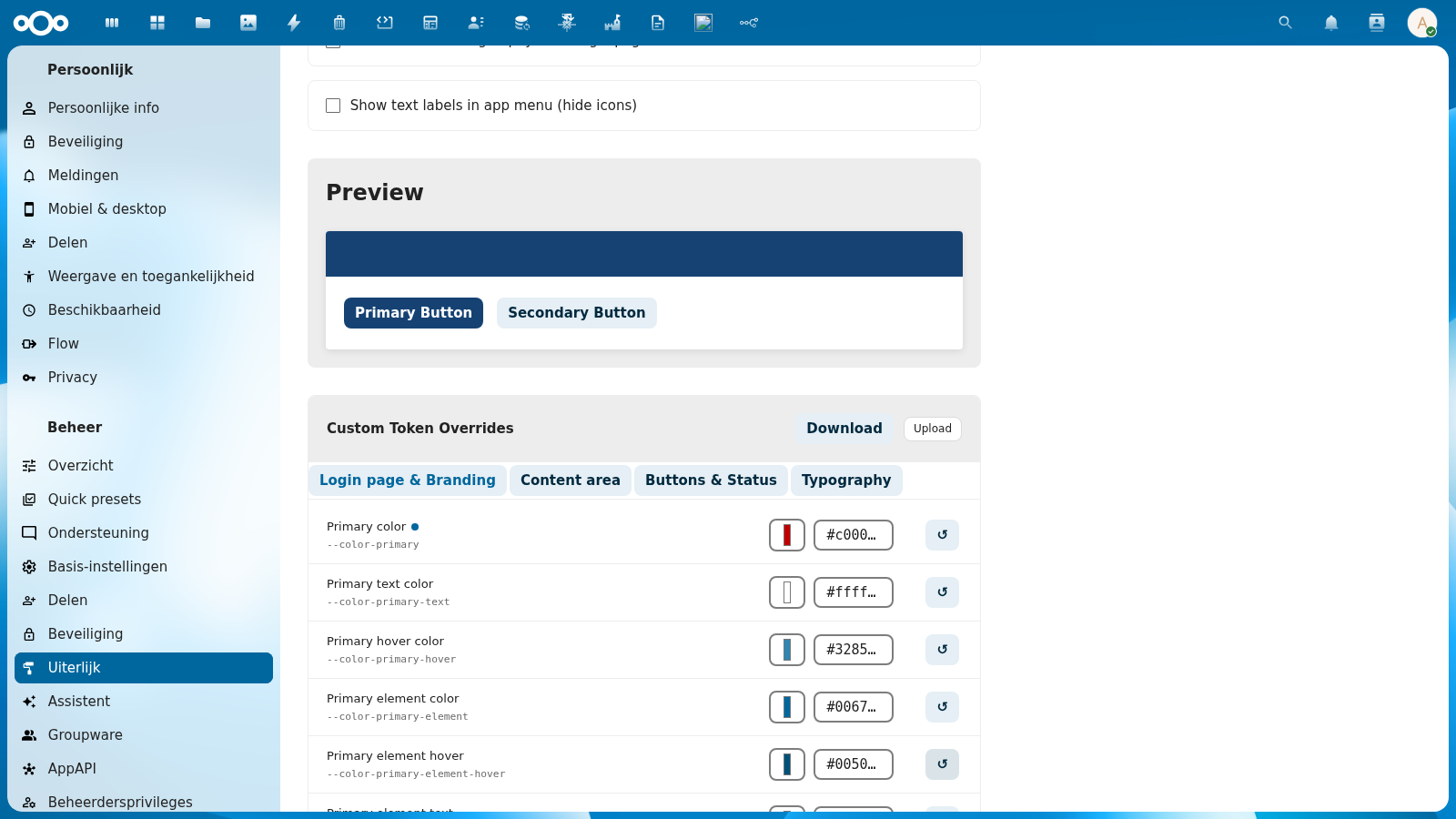
Download (Export)
Click Download to download your current custom token overrides as a CSS file named custom-overrides.css.
The exported file contains a :root {} block with only the tokens you have explicitly overridden — tokens that match the token set's defaults are not included.
Example exported file:
:root {
  --color-primary: #c00000;
  --color-primary-hover: #a00000;
}
If you have no overrides, the downloaded file contains an empty :root {} block.
Use cases:
- Back up your customizations before switching token sets
- Transfer overrides from one Nextcloud instance to another
- Version-control your organization's token customizations
- Share a theme configuration with colleagues
Upload (Import)
Click Upload to import token overrides from a CSS file. The app parses the :root {} block from the uploaded file and applies matching tokens.
What happens during import:
- The CSS file is parsed to extract all CSS custom property declarations from
:root {} - Each token is checked against the list of editable tokens
- Known tokens are imported and applied as custom overrides
- Unknown tokens (not in the editable token list) are silently skipped
- Excluded tokens (read-only system tokens like
--color-main-background) are rejected with an error
After a successful import, the page shows a brief summary:
{ "status": "ok", "imported": 2, "skipped": 1 }
The imported values are applied immediately as a live preview. Click Save overrides to persist them.
Use cases:
- Restore a previously downloaded backup
- Import a token configuration from another instance
- Apply a pre-built token theme from a design team
Supported CSS Format
The import accepts standard CSS files with a :root {} block:
:root {
  --color-primary: #005A9C;
  --color-primary-hover: #004080;
  --font-face: 'Fira Sans', sans-serif;
}
- Each line must be in the format
--property-name: value; - Multiple values per line are not supported
- Only CSS custom properties (starting with
--) are parsed - Comments and other CSS rules outside
:root {}are ignored
Editable vs. Excluded Tokens
Import and export cover every token the token editor shows, 712 on this release, and the dark value you gave each colour. A file exported before these tokens existed still imports as before. A few Nextcloud variables stay out of reach:
- image variables such as
--image-logo, which carry a picture, not a design value; - variables Nextcloud's own JavaScript writes on every render, which a stylesheet value cannot hold.
The variable inventory lists each one with its reason.
Attempting to import an excluded token via the API returns an HTTP 400 error. During file upload, excluded tokens are counted as skipped.
Download as design tokens
For Figma, choose the format in the list next to the button. Token sets and Figma has the formats, the path of every token and what a round trip loses.
Take a token set to Tokens Studio, Figma or any other tool that reads W3C Design Tokens (DTCG, version 2025.10). Choose the set in the Design token set list and click Download as design tokens, next to Reset theme to Nextcloud. Every custom set has the same button in its row under Custom token sets. You get {set}.tokens.json.
The file holds what the set itself declares. The defaults under it and your token editor overrides stay out: they belong to this instance, not to the set.
Each value gets a DTCG type by its shape: colours, px and rem sizes, ms and s durations, easing curves, font stacks, font weights and plain numbers. A var() to another token in the set becomes an alias. Values DTCG has no type for, such as gradients, em or %, go into a cssOnly block of the file, which design tools ignore and thematiq reads back. A deprecated token carries its notice in $deprecated.
Colours
A colour is written as a colour object with its colour space and an sRGB hex fallback. A hex, rgb(), hsl() or named colour is written in srgb. A colour in oklch(), oklab(), lab(), lch(), hwb() or color() keeps its own colour space.
When you upload a design tokens file, every colour space DTCG lists is converted to sRGB, because the contrast check, the dark palette and Nextcloud's own theming all read sRGB. A colour outside the sRGB range uses the file's own hex when it has one, or is clipped to the nearest sRGB colour. The upload result lists each colour that changed this way.
Out and back in
Upload a file thematiq exported, under a new name, and every --nldesign-* value comes back as it was. Brand palette names move to the new set's prefix; tokens that point at them follow. The round trip is exact from thematiq to thematiq. Another tool may drop the nl.conduction.thematiq extension, and then names fall back to the standard mapping table.
Command Line Alternative
Your overrides are kept in Nextcloud's app data. To read them on the server:
cat "$(occ config:system:get datadirectory)/appdata_$(occ config:system:get instanceid)/thematiq/css/custom-overrides.css"
Do not edit that file by hand. Nextcloud keeps a file cache for app data, and it does not see a change made outside it. Reset or replace your overrides on the admin page, or through the REST API.
Or via the REST API:
# Get current overrides
curl -u admin:password http://nextcloud.example.com/apps/thematiq/api/settings/overrides

# Set a specific override
curl -u admin:password -X POST \
  -H 'Content-Type: application/json' \
  -d '{"overrides": {"--color-primary": "#005A9C"}}' \
  http://nextcloud.example.com/apps/thematiq/api/settings/overrides
The OpenProject plugin's set file
The OpenProject plugin openproject-thematiq keeps one design system as a small JSON file: its eighteen roles, an optional menu, the rest of the set's tokens as its vocabulary, its dark roles and a logo verdict. Thematiq writes and reads that file, so a set moves between the two products without a link between them.
Download. Choose OpenProject plugin set file in the format list next to Download as design tokens. You get thematiq-{set}.json. The address is GET /apps/thematiq/settings/tokensets/{id}/set-file. The file is the set's entry in the shell catalogue: the same roles, vocabulary and dark block. A shipped set carries its logo verdict. An uploaded set names no logo.
Upload. Upload the file under Custom token sets, like any other. Each role is stored under the name thematiq reads it from: primary as --nldesign-color-primary, text as --thematiq-shell-text, menu as --thematiq-shell-menu, and so on, as listed in Token sets and Figma. Each vocabulary key is stored with --nldesign- in front. The upload result names what was left out:
| Reason | Meaning |
|---|---|
unmapped | A role thematiq does not know, or a vocabulary key that is not a token name. |
value-not-a-css-value | Not a text value, empty, or holding a brace. |
The dark block is read as well: its roles and its vocabulary become the set's dark values, which win over the dark colours thematiq would derive. Every value still passes the token set validator, a dark one too, and the 512 KB limit holds.